⭐ 1.5 字符串(末)
解析字符串中的数字
在介绍字符类型的时候,提到过一种比较鸡贼的把数字字符转换为真正的数字的办法:利用数字在Unicode字符表中连续排列的特性,把字符的编号与'0'的编号相减。
到了字符串,还用这招就显得捉襟见肘了。我们直接用C#提供的TryParse()方法:
简化写法
注意到 ℹ️IDE0018 了吗?如果在解析字符串b之前,承接结果的变量a不用干什么的话,可以在TryParse()里声明它:
假如解析失败也不要紧,此时a依然可用,值是类型的默认值。int类型的默认值是0。
在这里,我们想把字符串"123"转换为整数123。为此调用了int类型的静态方法TryParse()。这个方法接受了两个东西,第一个是待转换的字符串b,第二个是承接转换结果的变量a。而且a前面还有一个out修饰符。整个方法还会返回一个布尔值,表示转换是否成功。
为什么这个方法长这么奇怪?具体原因我们在第3章会详细介绍。但现在我们可以先推测一下。第一个问题:为什么TryParse()不像上一页的那些方法一样,跟字符串实例绑定,而是与转换的目标类型绑定呢?
各管各的好处就是新增类型的时候,由新类型来实现对应的TryParse()。否则每加一种类型都要去改string类,最终会变成臃肿的屎山。出于同样的理由,实现“伪类型转换”的那个ToString()方法也是各管各的。
下一个问题:为什么解析出来的整数不作为方法的返回值?你别说,Parse()方法就是这么设计的:
如果解析成功还好。解析失败的话,它会直接抛一个运行时错误出来。不想每次都处理异常的话,还是乖乖地用TryParse()吧。你可以根据返回值判断是否解析成功,从而进行应对:
int a;
string b = "123#";

bool result = int.TryParse(b, out a);

if (result)
{
    Console.WriteLine(a);
}
else
{
    Console.WriteLine("解析失败");
}
想解析其他数值类型?依葫芦画瓢就行:
用字符构造字符串
有些编程语言支持通过字符与整数“相乘”构造由若干个该字符组成的字符串,例如'a' * 3会得到字符串"aaa"。在C#中,虽然不支持这种运算,但我们可以这样:
new()是new string()的简写,这个方法会创建一个字符串实例。new('a', 3)就表示创建3个字符'a'组成的字符串"aaa"。
猜数字游戏
我知道这个案例很老套。但是……就它吧。
先把玩法介绍打在公屏上:
Console.WriteLine("Welcome to the Guess the Number Game!");
Console.WriteLine("I have selected a number between 1 and 100. Can you guess it?");
Console.WriteLine("You have 10 attempts to guess the number. Good luck!");
接下来,从1~100之间随机挑一个数字作为答案:
Random是用于生成随机数的类,我们后面有机会再详细聊它。现在只需照抄上面的代码就行。
先来一个布尔变量记录玩家有没有猜中,游戏结束后据此输出结算话语:
只给玩家10次猜测的机会。用一个for循环把猜测环节套住:
每轮猜测先提示玩家现在是第几轮,请玩家输入数字:
for (int attempt = 1; attempt <= 10; attempt++)
{
    Console.Write($"Attempt {attempt}: Enter your guess: ");
    string userInput = Console.ReadLine();
}
尝试解析玩家的输入,如果解析失败要提示玩家输入数字:
for (int attempt = 1; attempt <= 10; attempt++)
{
    Console.Write($"Attempt {attempt}: Enter your guess: ");
    string userInput = Console.ReadLine();

    bool isNum = int.TryParse(userInput, out int guessedNumber);

    if (isNum)
    {
    }
    else
    {
        Console.WriteLine("Invalid input. Please enter a number.");
    }
}
如果解析成功,把解析结果guessedNumber与答案numberToGuess进行比较。如果有偏差,提醒玩家调整;如果猜中了,就把isGuessed设置为true,然后结束循环。
for (int attempt = 1; attempt <= 10; attempt++)
{
    Console.Write($"Attempt {attempt}: Enter your guess: ");
    string userInput = Console.ReadLine();

    bool isNum = int.TryParse(userInput, out int guessedNumber);

    if (isNum)
    {
        if (guessedNumber == numberToGuess)
        {
            isGuessed = true;
            break;
        }
        else if (guessedNumber < numberToGuess)
        {
            Console.WriteLine("Too low! Try again.");
        }
        else
        {
            Console.WriteLine("Too high! Try again.");
        }
    }
    else
    {
        Console.WriteLine("Invalid input. Please enter a number.");
    }
}
最后,根据isGuessed确定玩家输赢:
if (isGuessed)
{
    Console.WriteLine($"Congratulations! You've guessed the number {numberToGuess}!");
}
else
{
    Console.WriteLine($"Sorry, you've used all 10 attempts. The number was {numberToGuess}. Better luck next time!");
}
为了让输出更井井有条,我们在每轮之间输出一个分界线。用new()来构造分界线字符串:
以下是完整代码:
// Guess the number

int numberToGuess = new Random().Next(1, 101);

Console.WriteLine("Welcome to the Guess the Number Game!");
Console.WriteLine("I have selected a number between 1 and 100. Can you guess it?");
Console.WriteLine("You have 10 attempts to guess the number. Good luck!");

bool isGuessed = false;

string divider = new('-', 50);

for (int attempt = 1; attempt <= 10; attempt++)
{
    Console.WriteLine(divider);
    Console.Write($"Attempt {attempt}: Enter your guess: ");
    string userInput = Console.ReadLine();

    bool isNum = int.TryParse(userInput, out int guessedNumber);

    if (isNum)
    {
        if (guessedNumber == numberToGuess)
        {
            isGuessed = true;
            break;
        }
        else if (guessedNumber < numberToGuess)
        {
            Console.WriteLine("Too low! Try again.");
        }
        else
        {
            Console.WriteLine("Too high! Try again.");
        }
    }
    else
    {
        Console.WriteLine("Invalid input. Please enter a number.");
    }
}

Console.WriteLine(divider);

if (isGuessed)
{
    Console.WriteLine($"Congratulations! You've guessed the number {numberToGuess}!");
}
else
{
    Console.WriteLine($"Sorry, you've used all 10 attempts. The number was {numberToGuess}. Better luck next time!");
}

Console.WriteLine(divider);
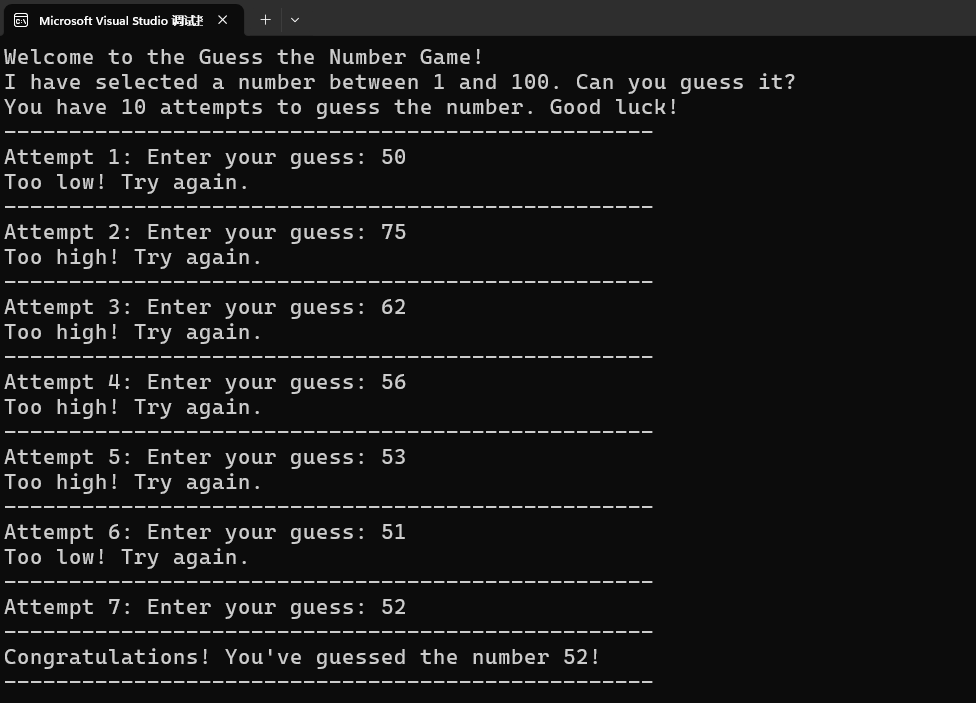
爽快开玩: